Start with the full visual
Use animated guidance while learning a new passage and watch the key changes ahead of the cursor.
See the next movement
Keep the score and saxophone keys in the same field of view, then reduce the visual help as the movement becomes familiar.


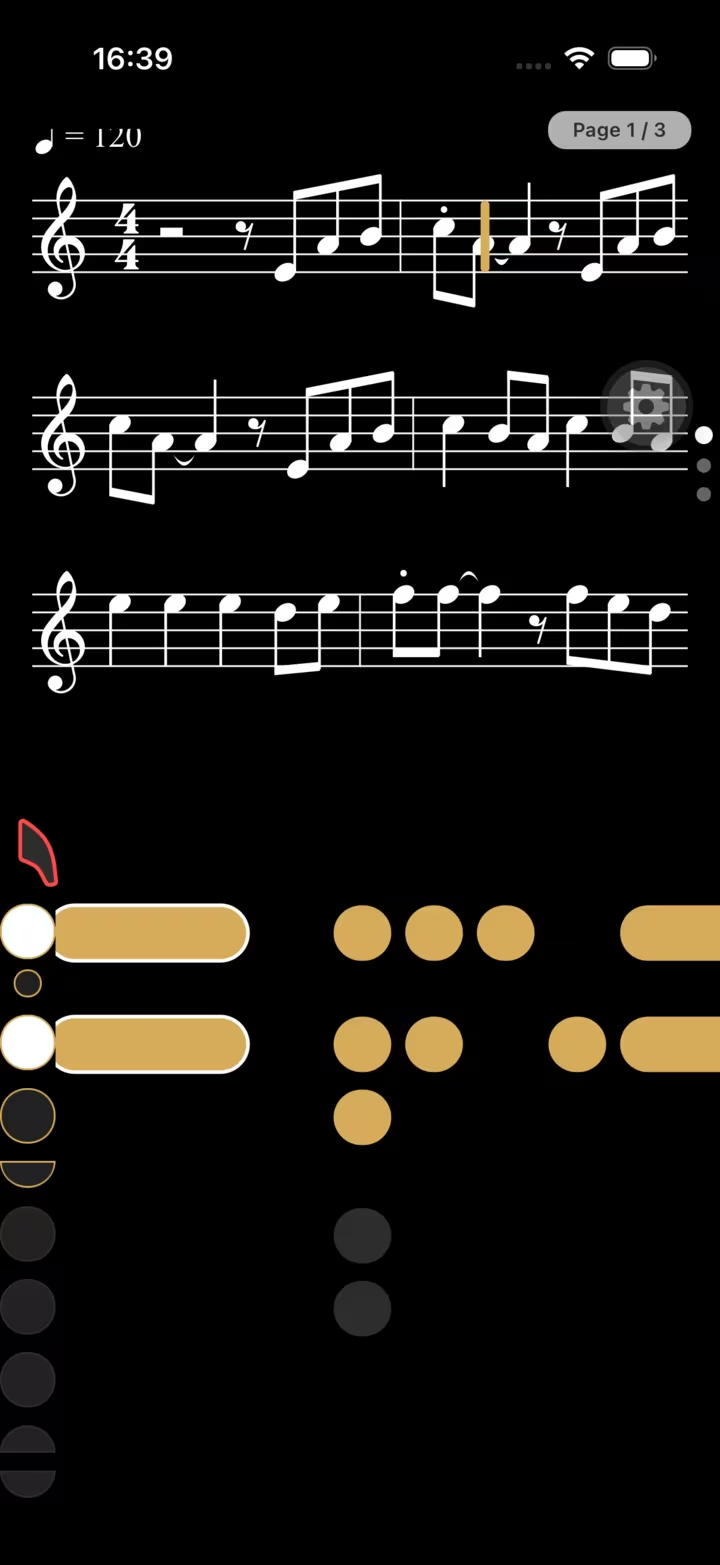
See the next movement
Choose a supported written note from C4 to C6. The interactive preview builds a short phrase around it and shows every key change at the cursor.
Preparing the animated fingering preview…
At the cursor
G4Keys at the cursor:
A bridge into reading
A fingering chart is useful before practice. Animated fingerings go further by placing the movement next to the music at the moment it matters.
Use animated guidance while learning a new passage and watch the key changes ahead of the cursor.
Switch to a static fingering when you only need a reminder for the current note.
Hide the panel when the passage is secure and return to it only when a movement needs checking.
How it works
Choose a song or exercise that supports the fingering panel.
Choose hidden, fixed or animated fingerings according to what you need.
Repeat the passage and remove visual support as the fingering becomes automatic.
Animated fingerings
The fundamental key system is shared across common saxophone types, while instrument setup and available ranges still matter.
Built for saxophone practice
Beginners can build the note-to-key connection. Returning players can refresh a forgotten movement. Experienced players can hide the display entirely.
“Exactly the kind of app this saxophonist was looking for: it listens to the playing and gives useful feedback.”Read reviews on the App Store
Frequently asked questions
The basic key system is largely shared across soprano, alto, tenor and baritone saxophones, although written range and instrument-specific alternatives can differ.
Yes. The panel supports hidden, fixed and animated display modes.
The animated panel currently uses the prepared written pitches available in the app between C4 and C6. The selector below only shows pitches that are actually present in that fingering map.
The animated timeline depends on fingering data prepared for the selected song or exercise. SaxoTools indicates when that data is not available.
Yes. Use the free web fingering chart to select a written note and inspect the corresponding keys.
Keep practising
Your next session starts here
Use SaxoTools to turn songs, exercises and evaluations into a focused saxophone routine.